We want everyone to feel included in all that Wellcome Collection has to offer.
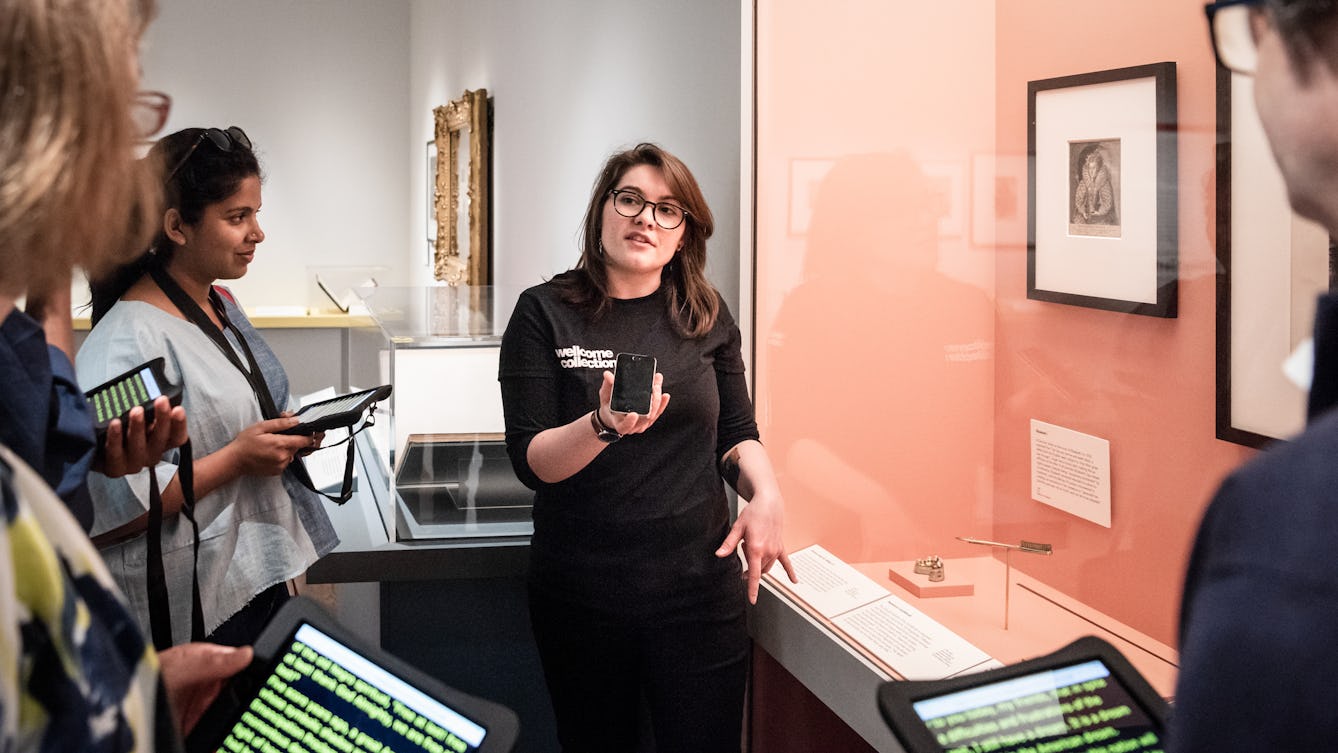
A speech to text tour at Wellcome Collection, Thomas SG Farnetti. Source: Wellcome Collection. Attribution-NonCommercial 4.0 International (CC BY-NC 4.0).
Our ongoing commitment is to make our building, services and programme as accessible and inclusive as possible, removing and reducing barriers to visiting us.
Our staff are aware of the diversity of visitors’ access requirements and are here to support you. Get in touch if you have any specific queries about accessibility. And after your visit, please share feedback about your experience so that we can continue to improve our accessibility services and facilities.
Contact the Visitor Experience team
Getting here
We’re located in central London and accessible by public transport. You can find information about getting here on our website, and about transport accessibility from Transport for London. If you would like one of our staff to meet you at the nearest station and help you make your way to our building, speak with our Visitor Experience team in advance.
We have limited parking available for Blue Badge holders. Please contact our visitor experience team to book.
Visiting Wellcome Collection Visual Story
Getting around the building
We are working with our building facilities and services to make your visit more accessible.
Assistance animals
You are very welcome to bring along your assistance animals. We recognise an assistance animal as being a companion without whose support a visitor would not otherwise be able to attend and participate in everything taking place at Wellcome Collection. No other animals are permitted in our building.
Owners are expected to take responsibility for their assistance animal throughout their visit. In order to protect our collections and for everyone’s comfort and safety, we politely ask you to observe our guidelines:
- your assistance animal should remain under your care and control throughout your visit, ideally remaining on a leash
- your assistance animal can only eat or drink in certain spaces in the building, as directed by our staff. We can provide a drinking bowl for your animal; just ask at the Information Point on level 0.
Accessible toilets
We have accessible toilets on all floors of the building. There is a Changing Places toilet on level 0. You can also find an accessible toilet with baby-changing facilities on level 0.
Exhibitions and events
We try to make our exhibitions and events accessible to as many people as possible, but how we do this can vary. You’ll find specific accessibility information on individual pages for events and exhibitions.
Live tours
We currently offer free live access tours of our exhibitions on request. This includes, but is not limited to:
- audio description
- British Sign Language-led
- British Sign Language-interpreted
- speech-to-text.
Since we reopened our buildings, we have been exploring with our visitors what our live tours could offer in the future. If you have thoughts about this, we would love to hear from you.
To arrange a tour, or discuss how we can make an exhibition or event more accessible in other ways, please get in touch in advance of your visit.
Visual access
Large print and magnifiers
We have large-print labels and guides for our exhibitions, and you can borrow a magnifying glass or magnifying sheet.
Subtitles
We subtitle and provide transcripts of all audiovisual content in exhibitions. In cases where we can’t use subtitles, we provide transcriptions and BSL recordings, which are available via QR code.
Braille
There are Braille titles and tactile reproductions of some objects in our ‘Being Human’ gallery.
Audio description
You can download or stream audio descriptions of every exhibit in ‘Being Human’ or take a highlights tour with 11 stops and optional directions in between. Please see the ‘Being Human’ exhibition page to find out more.
The audio guide offer for our temporary galleries varies between exhibitions. You’ll find specific accessibility information on individual pages for events and exhibitions.
Assistive study room
If you are researching and studying in the library, you can book time in the assistive study room, which has a computer with screen-reading software.
Screen-reading software
A range of accessibility software and assistive equipment is available for researchers in the library, either in the assistive study room or on request from the library Enquiry Desk.
- JAWS screen-reading software, which uses a multi-lingual speech synthesiser to read aloud information from the screen.
- A Zoomtext screen magnifier that includes a range of colour and cursor controls.
- Kurzweil, software that uses a scanner and speech synthesiser to read aloud what you scan.
- High-contrast enlarged-text keyboard.
- Handheld magnifiers, a portable fluorescent magnifier with daylight simulation tube, and an Aladdin Rainbow Elite book magnifier with a range of colour and contrast controls.
Auditory access
Induction loops
There are fixed induction loops at:
- the Information Point on level 0
- Wellcome Café on level 0
- the library Enquiry Desk on level 2
- the Rare Materials Room on level 3
- the Reading Room
- the venue hire reception on level -1 and many of the rooms available for hire, including the Williams Lounge, Frank and Steel Rooms, Dale Room, Burroughs Room and the private dining room
- the Henry Wellcome Auditorium and the Forum.
We also have portable induction loops. Contact the Visitor Experience team to reserve a portable loop for your visit.
Headphones
If you’re doing research in the library, you can borrow headphones for use with hearing aids as recommended by Action on Hearing Loss (RNID). Ask at the library Enquiry Desk.
Wheelchair and physical access
There is step-free access throughout our building. If your wheelchair or mobility device is 75 cm or wider, access to certain areas of the building may be limited. Please contact us if you have a larger device and we can help you plan your visit.
You can also borrow a wheelchair from us during your visit – just ask at the Information Point on level 0. Or contact us in advance if you would like to reserve a wheelchair.
Sometimes visitors need to queue while waiting for an event. If queuing is not accessible for you, please speak to a member of staff and we can make alternative arrangements with you.
Assistive equipment
If you are coming to do research in the library, we have assistive equipment, which you can request from the library Enquiry Desk on level 2. Equipment includes:
- electronic height-adjustable tables in the access study room and Rare Materials Room
- left and right-handed ‘vertical’ mouse
- adjustable chairs and footrests
- a bookable assistive study room.
If our bookshelves are not accessible to you, we can locate and bring the books to your desk.
Sensory access
Wellcome Collection is in central London, and we have several exhibition spaces and a library spread over three floors of our building. Some areas can be busy and loud, especially the Atrium at the entrance. Other areas upstairs are often much quieter. Ask staff if you need help finding a quieter space.
Weekday mornings and Thursday evenings are usually the quietest times to visit, though we cannot guarantee that.
To help make our building more comfortable, you can borrow tinted glasses, tinted visors, ear defenders and weighted lap pads. Please ask a member of staff at the Information Point, in the galleries, or in the library.
Baby feeding and changing
We welcome our visitors breastfeeding and bottle-feeding their babies in all areas of the Wellcome building (including the galleries). Please ask us if you need any assistance.
You can find an accessible toilet with baby-changing facilities on level 0.